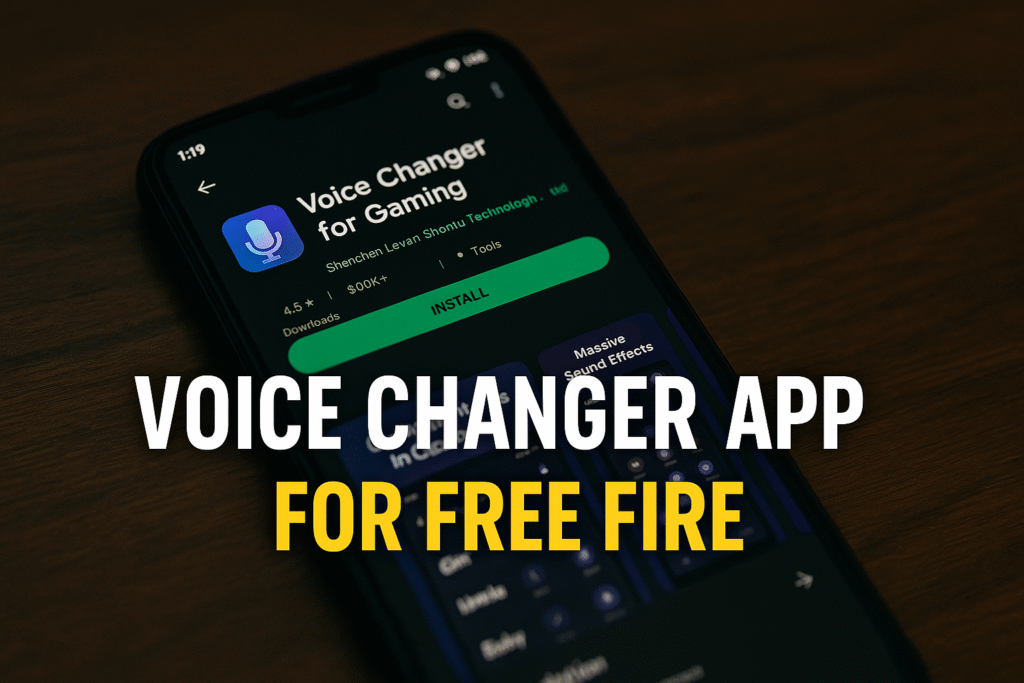
A voice changer app for Free Fire may produce entertaining recordings without changing what your squad hears in a match. That distinction matters before you install anything or pay for effects. A “gaming” label on a store page does not establish compatibility with Free Fire’s live microphone input.
This guide reviews the app previously linked on this page, explains the evidence limits and gives you a practical microphone checklist. We have not performed a live match test, measured delay or obtained Garena approval for this third-party app.
Source review: 18 October 2026. Check your own device and regional store for availability.
App and compatibility overview
| Item | What was checked |
|---|---|
| Listed name | Voice Changer for Gaming |
| Publisher | Shenzhen Leyuan Shentu Technology Co., Ltd |
| Package | com.lyy.voiceChanger |
| Store update shown | 13 October 2026 |
| Publisher description | Voice effects, adjustable sound, recording, saving and sharing |
| Free Fire live routing | Not established by our review of the listing |
| Garena endorsement | Not established |
Jump to: Listing checks · Audio limits · Microphone help · FAQ · Uninstall
What the official listing actually tells us
The Google Play listing for Voice Changer for Gaming describes changing vocal tone, adjusting effects, recording and sharing output. Those are developer statements. We have removed the earlier blanket description of the app as one of the safest and most stable options because this review cannot substantiate that comparison.
Check the developer and package rather than the icon alone. Before installation, read the current permissions, privacy information and any purchase screen. Store availability and compatibility may differ by phone and country. We are not retaining an old version number, file size or minimum Android claim as if it were confirmed for every current installation.
Why an effect preview may not reach your squad
Google’s Android audio-input documentation describes priority rules when apps compete for microphone input. In the ordinary two-app scenario, one can receive audio while the other receives silence. That is an important limitation, but it is not a test result for this particular app.
Our practical inference: opening a voice changer beside Free Fire is not enough to establish that processed sound is routed into the game. Hearing an effect locally proves only that local playback worked. The earlier instruction that Free Fire will automatically receive the changed voice was too definite.
Separate your goal into two cases. For a recorded gaming montage, you can edit your own commentary after the session. For live squad communication, clear speech and reliable microphone operation matter first. Do not assume a recording workflow is also a live-chat workflow.
Fix the normal microphone before testing effects
Garena’s microphone help page points Android users to the game’s microphone permission. Start with the official game alone, with extra audio apps closed.
- Check permission: open Android Settings, choose Apps, then your installed Free Fire version and Permissions. Allow microphone access if you want to use voice chat.
- Check the game controls: confirm you have enabled the intended voice channel and are not muted. Labels can differ between releases.
- Test with a teammate: ask whether they hear a short, ordinary sentence clearly before adding effects.
- Check the headset: examine its mute control and connection. Compare with the phone microphone to isolate where the problem occurs.
- Record the result: note whether you can hear others, whether they can hear you and which input device was connected.
Change one thing at a time. If normal chat works until another audio app opens, that observation is useful for support. It does not prove you need more permissions or a modified game client. Avoid clearing all app data as a first step, especially if you have not checked how your game account is linked.
Account rules and third-party tools
Garena’s Anti-Hack FAQ warns against unauthorised programs and modified clients. This is not permission to use a particular voice tool. We cannot promise that every effect app is allowed or that an account will never face enforcement.
Do not install packages that also advertise game patches, cheats, anti-ban functions or competitive advantages. If a tool needs to alter game files, stop and ask official support about the exact product. A Play Store listing by itself is not evidence of Garena approval.
If you want a character voice for a clip, consider creating the voice-over after gameplay using your own recording. Keep it clearly presented as an effect. This avoids making your squad depend on an unverified audio setup while they are trying to coordinate.
Make communication useful for teammates
Before any supported effect experiment, agree on a short test with friends. Use a simple phrase they can repeat back. If they mishear directions or notice distracting delay, return to ordinary voice chat. A filter is optional; understandable callouts are more useful than a dramatic sound.
Do not rely on an altered voice to hide your identity. Your account, messages and other shared details can still identify you. Respect a teammate’s request to stop an effect, and do not record or publish private squad conversations without their agreement.
Frequently asked questions
Does this app definitely work inside Free Fire?
We have not verified that. The listing describes audio effects, but our review does not establish supported live routing into Free Fire.
Does “on Google Play” mean Garena approved it?
No. App distribution and a game publisher’s approval are separate questions. Consult Garena for an uncertain integration.
Why do I hear a robot effect but my friend hears my normal voice?
The effect may be local playback rather than the game’s input. Restore normal chat and check the tool’s documented compatibility instead of assuming another APK will fix it.
Uninstall an unwanted voice changer
Save any personal audio you want to keep, then use Android’s app-information screen to uninstall the voice changer. Recheck the game’s normal microphone afterwards. If you subscribed to an effect service, cancel through the billing provider separately; uninstalling does not cancel Google Play subscriptions.
Sources and update policy
This article uses the linked publisher listing, Android developer documentation and Garena support guidance. It replaces unsupported compatibility and safety guarantees. Future changes will distinguish publisher claims, documented platform behaviour and any separately recorded hands-on testing.
More Articles You May Like




1 thought on “Voice Changer App for Free Fire: Compatibility and Mic Checks”