15-Second Quick Answer
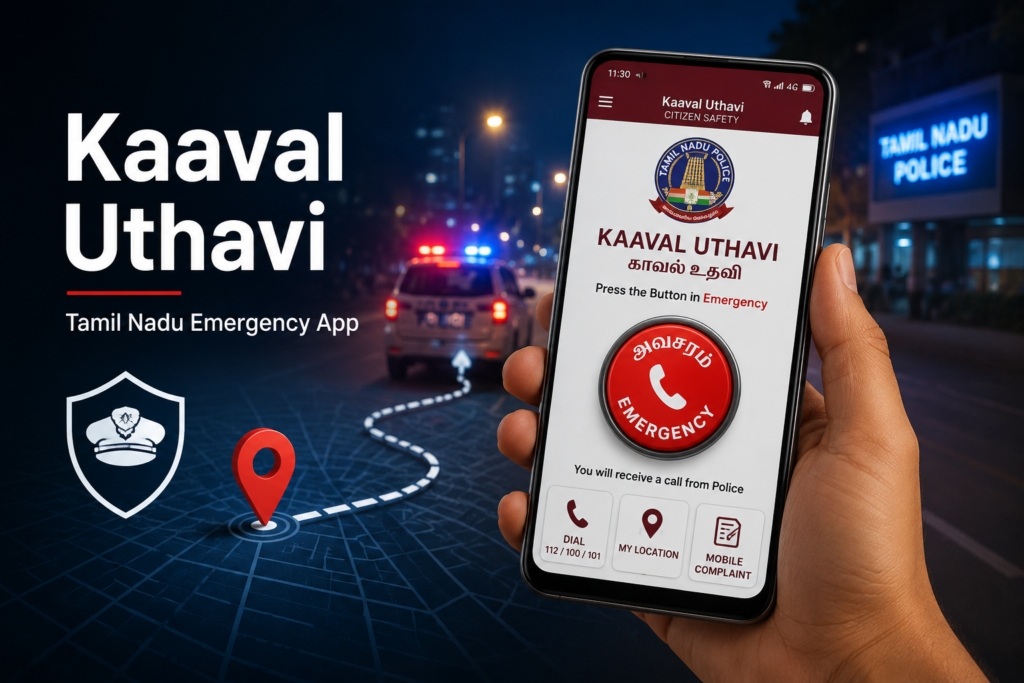
Kaaval Uthavi is the official emergency assistance app developed for the Tamil Nadu Police. It is designed to help people quickly contact the police during emergencies by sharing their live location, sending emergency alerts to the control room, notifying trusted family members, and providing access to several police services from a single app.
Unlike a normal emergency calling app, Kaaval Uthavi attempts to reduce response time by automatically identifying your registered mobile number, location, and nearest police station when an emergency is triggered.
For people living in or travelling through Tamil Nadu, it is one of the most useful public safety apps to keep installed—even if you never need to use it.
Table of Contents
Most people install emergency apps hoping they will never have to use them.
But emergencies rarely arrive with warning.
It could be a late-night vehicle breakdown, someone following you while walking home, a medical emergency where you cannot explain your location properly, or witnessing a crime that requires immediate police attention.
In these moments, every second matters.
Calling emergency services is useful, but explaining your exact location while under stress isn’t always easy. Kaaval Uthavi tries to solve that problem by sending your location automatically while also notifying the Tamil Nadu Police Control Room and your chosen emergency contacts.
Rather than replacing emergency numbers, the app acts as an additional communication layer that helps emergency responders understand where you are and what assistance you may need.
Why People Search for Kaaval Uthavi
Most users discover this app after hearing about it from:
- Tamil Nadu Police awareness campaigns
- College safety programs
- Women’s safety initiatives
- News reports
- Friends or family recommendations
- Government service portals
But once they reach the Play Store, many questions remain.
- Is it official?
- Does it really work?
- Does it track me all the time?
- Will it work without mobile data?
- Is it only for women?
- Can tourists use it?
- Does it send alerts to family members?
- What happens after pressing the Emergency button?
This article answers all of those questions.
What Is Kaaval Uthavi?
Kaaval Uthavi is an official citizen safety application developed for the Tamil Nadu Police.
Its primary goal is simple:
Help police reach people faster during emergencies.
Instead of only making a voice call, the app combines several important pieces of information into one emergency request:
- Your registered identity
- Live GPS location
- Emergency alert
- Nearest police jurisdiction
- SMS backup when internet quality is poor
- Notification to family members
The app also serves as a gateway to several Tamil Nadu Police online services.
So it is not merely an SOS button.
It is also a digital police service platform.
How the Emergency System Works
Many users assume the app simply calls the police.
Actually, several things happen almost simultaneously.
Step 1
The user presses the large Emergency button.
Step 2
The app immediately sends:
- Current GPS location
- User registration details
- Emergency request
to the Tamil Nadu Police Control Room.
Step 3
The control room identifies:
- nearest police station
- nearby police vehicle
and forwards the emergency.
Step 4
Trusted family members receive an SMS emergency notification.
Step 5
If mobile internet becomes weak or unavailable, the app attempts to send emergency information through SMS packets containing the last known location.
This backup mechanism is one of the more practical features because network quality often becomes unreliable during travel or in remote locations.
Registration: Why It Matters
Some users rush through registration without understanding why it exists.
The registration process helps emergency responders identify:
- your mobile number
- your name
- emergency contacts
This allows the control room to respond more quickly instead of first verifying the caller’s identity.
If you change your mobile number later, remember to update it inside the app. An outdated registration could delay assistance.
Main Features Explained
Emergency SOS
The app’s most important feature.
One press can notify the police control room while sharing your location.
Dial 112 / 100 / 101
Some emergencies require speaking directly to an operator.
The app includes quick dialing for major emergency numbers.
Because the registered number is already known, responders may identify your location faster than during an unregistered emergency call.
Mobile Complaint Submission
Not every police matter requires visiting a station immediately.
Users can submit certain complaints directly through the app.
Depending on the complaint category, it may also support attaching:
- photos
- short videos
This is particularly useful for reporting incidents while evidence is still available.
Live Location Sharing
This feature is different from Emergency Mode.
You can voluntarily share your live location with family or friends through services like:
- Google Maps
This is useful during:
- solo travel
- late-night journeys
- long taxi rides
- shopping trips
- outdoor events
Police Station Locator
Instead of searching online, users can quickly locate nearby police stations and obtain directions.
This becomes especially helpful in unfamiliar towns.
Control Room Directory
Provides important police contact numbers with direct dialing support.
Other Emergency Helplines
The app also includes additional emergency contacts, reducing the need to search multiple websites during urgent situations.
Tamil Nadu Police e-Services
Several online police services are integrated into the application, including:
- Police Verification
- Vehicle Verification
- Lost Document Report
- FIR Status
- CSR Status
Rather than installing separate apps or searching multiple government portals, users can access these services more conveniently.
Real-Life Situations Where the App Can Help
Technology becomes meaningful only when it solves real problems.
Here are a few realistic examples.
A Student Returning Home
A college student returns home after evening classes.
She notices someone repeatedly following her.
Instead of trying to explain her location while frightened, she presses the Emergency button.
Her location reaches the police control room while her family also receives an alert.
Highway Breakdown
A family experiences a vehicle breakdown on a dark highway.
The location-sharing feature helps relatives locate them while emergency services can also identify where assistance is needed.
Elderly Parent Living Alone
An elderly person living independently may not remember nearby police numbers.
The app provides one-touch emergency access without searching for contact information.
Witnessing an Incident
Suppose someone witnesses vandalism or a dangerous situation.
Instead of waiting until later, they can submit a complaint while photos or short videos are still available.
Benefits That Are Easy to Miss
Many reviews focus only on the SOS button.
Several practical advantages receive less attention.
Automatic location sharing reduces confusion
During emergencies, people often struggle to describe roads, landmarks or village names accurately.
GPS solves much of this problem.
Family awareness
Police assistance is important.
But informing family members immediately can be equally valuable.
Backup through SMS
One thoughtful design choice is the SMS fallback mechanism.
Internet access is not always reliable.
Sending emergency information via SMS increases the chances that help can still be requested.
Multiple services in one place
Instead of remembering different police websites and phone numbers, users have one centralized platform.
Hidden Limitations You Should Know
No emergency app is perfect.
Understanding the limitations helps you use it more effectively.
GPS Accuracy Depends on Your Phone
Indoor environments, underground parking, or dense buildings may reduce GPS accuracy.
Battery Matters
If your phone battery is nearly empty, emergency features become less useful.
Keeping some battery available is still your responsibility.
Registration Should Stay Updated
Old phone numbers or outdated emergency contacts reduce effectiveness.
Network Availability Still Matters
Although SMS backup exists, extremely poor network coverage may still affect communication.
No smartphone application can overcome a complete absence of mobile connectivity.
Safety Analysis
Overall, Kaaval Uthavi follows a practical emergency-first design philosophy.
Rather than overwhelming users with many complicated menus, the core emergency functions remain easy to access.
That simplicity matters.
In genuine emergencies, users should not need to navigate through multiple screens before requesting help.
One particularly sensible design choice is combining police notification with family notification. Many emergency apps only contact one or the other.
Privacy Analysis
Whenever an app uses location, privacy naturally becomes an important question.
The reassuring point is that Kaaval Uthavi requests location primarily for emergency assistance and related services rather than for advertising or social networking.
Still, users should understand a few things:
- Emergency services require location access to function correctly.
- Live location sharing is user-initiated rather than continuously broadcast to friends.
- Registration details help police identify the person requesting assistance.
As with any app handling personal information, users should download it only from official app stores and review permission requests during installation.
Performance Review
The application is not designed to compete with polished consumer apps or social media platforms.
Its priority is reliability over visual effects.
Navigation is generally straightforward, with clearly labeled sections and large touch targets that are practical during stressful situations.
Some users may notice that the interface looks more functional than modern, but for an emergency application, ease of use is more important than visual styling.
Kaaval Uthavi vs Simply Calling 112
| Feature | Kaaval Uthavi | Regular Emergency Call |
|---|---|---|
| Voice Call | ✅ | ✅ |
| Live GPS Sharing | ✅ | Limited |
| Family SMS Alerts | ✅ | ❌ |
| Police Services | ✅ | ❌ |
| Complaint Submission | ✅ | ❌ |
| Police Station Locator | ✅ | ❌ |
| Location Backup via SMS | ✅ | ❌ |
Calling emergency services is always appropriate during urgent situations.
However, Kaaval Uthavi adds several useful layers of information that may help responders reach you more efficiently.
Expert Recommendations
If you decide to install the app, spend five extra minutes preparing it properly.
- Register using your primary mobile number.
- Add family members who will actually answer emergency messages.
- Enable location permission.
- Allow SMS permissions if requested for emergency backup features.
- Test the interface so you know where the Emergency button is—but avoid sending false emergency alerts.
Preparation is far more useful than trying to learn the app during a crisis.
Common Mistakes Users Make
One mistake is installing the app and never opening it again.
Emergency apps should be checked occasionally to ensure:
- permissions remain enabled,
- emergency contacts are current,
- location services work correctly,
- the app is updated.
Another common misconception is assuming the app replaces personal safety practices. It does not. Staying aware of your surroundings, keeping your phone charged, and sharing travel plans with trusted people remain important.
Frequently Asked Questions
Is Kaaval Uthavi free?
Yes. The app is available free of charge through the official app stores.
Is it an official Tamil Nadu Police application?
Yes. It is provided for public safety and police assistance in Tamil Nadu.
Can tourists use it?
Visitors traveling within Tamil Nadu may find it useful, especially for accessing emergency assistance and nearby police services. Registration requirements should be completed before relying on emergency features.
Does the app work without internet?
Some emergency information can be transmitted through SMS when data connectivity is poor, but mobile network availability is still required.
Does it continuously track my location?
The app’s emergency and location-sharing functions are designed for assistance purposes. Location access is primarily used when needed for these services rather than continuously broadcasting your movements.
Can I report complaints through the app?
Yes. Certain complaint categories allow users to submit information directly, including supporting images or short videos where applicable.
Can family members receive alerts?
Yes. Registered emergency contacts can receive SMS notifications during emergencies.
Does it replace calling emergency numbers?
No. The app complements emergency calling by adding location sharing, user identification, and digital police services.
Final Verdict
Kaaval Uthavi is one of those apps that people hope they never need—but may be grateful to have when an emergency occurs.
Its greatest strength is not any single feature. Instead, it combines several important capabilities into one place: emergency alerts, automatic location sharing, family notifications, police contact services, complaint submission, and access to Tamil Nadu Police e-services.
It also shows an understanding of real-world conditions by including SMS-based fallback support when internet connectivity is weak, a feature many users overlook but which can be valuable during emergencies.
The app is not intended to be a polished lifestyle application, and its interface reflects its practical purpose. What matters most is that the essential emergency tools remain accessible and easy to use.
For residents of Tamil Nadu, students, senior citizens, daily commuters, solo travelers, and anyone who spends time on the road, Kaaval Uthavi is a sensible app to install before an emergency—not after one.
More Articles You May Like