If you want to use UPI, recharge your phone, pay bills, or send money quickly, you may be searching for the Paytm app download latest version 2026. But before installing it, there are a few important things every user should know.
Many websites only tell you where to download Paytm. They do not explain the truth about fake APK files, privacy risks, unnecessary permissions, or whether you even need the app. In 2026, that matters more than ever. Many people search for “Paytm app download latest version 2026” because they want the newest features, better security, and fewer app problems.
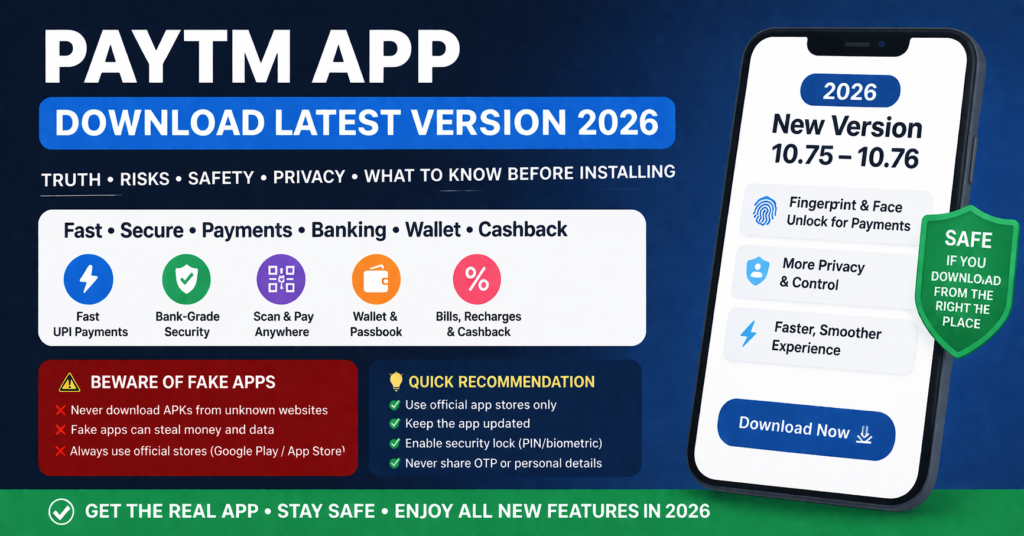
The latest version of Paytm in 2026 gives faster UPI payments, improved privacy controls, a cleaner design, fingerprint or face unlock for payments, and better bank account management. However, there are also some risks, limitations, and common mistakes that users should understand before installing it. However, many users still make mistakes by downloading fake versions from random websites. That can be risky.
This guide explains exactly what the Paytm app is for, how to download the latest version safely, what is new in 2026, when it is useful, when you should avoid it, and whether you really need it.
Quick Overview
| Feature | Details |
|---|---|
| App Name | Paytm: Secure UPI Payments |
| Main Use | UPI payments, recharge, bill payment, money transfer |
| Latest 2026 Version | Around 10.75–10.76 series |
| Developer | One97 Communications Ltd. |
| Android Requirement | Android 7.0 or later |
| Cost | Free |
| Safe Download Source | Google Play Store or Apple App Store only |
| Best For | UPI, bill payments, mobile recharge, bank transfers |
What Is the Paytm App Used For?
Paytm is a finance app mainly used for:
- Sending money through UPI
- Receiving money into your bank account
- Mobile recharge and DTH recharge
- Electricity, water, gas, broadband, and credit card bill payments
- Fast QR code payments in shops
- Booking train, bus, or flight tickets
- Checking bank balance from linked accounts
- Managing spending history in one place
For most users, the main reason to install Paytm in 2026 is simple: it lets you do many daily payments in one app instead of installing multiple apps.
Where to Download the Real Paytm App in 2026 and What to Avoid
Only download Paytm from official app stores. Do not use APK websites, modified versions, or links sent through unknown WhatsApp messages.
Safe Way to Install on Android
- Open Google Play Store
- Search for “Paytm: Secure UPI Payments”
- Check that the developer is “One97 Communications Ltd.”
- Tap Install
- Wait for the app to finish downloading
- Open the app and enter your mobile number
- Verify the number and link your bank account if needed
Safe Way to Install on iPhone
- Open Apple App Store
- Search for “Paytm”
- Confirm the developer name
- Tap Get
- Install and open the app
- Sign in using your mobile number
Light Google Discover Style Table: Is It Worth Installing?
| If You Want To… | Should You Download Paytm? |
|---|---|
| Use UPI daily | Yes |
| Recharge mobile and pay bills in one app | Yes |
| Only make very few online payments | Maybe |
| Already use another UPI app comfortably | Not necessary |
| Use an old phone with low storage | Check storage first |
| Download from unofficial websites | No |
What Has Actually Changed in the Latest Paytm Version 2026?
The latest Paytm app in 2026 is not just a small update. It includes several changes that make payments easier and safer.
1. Fingerprint and Face Payment Approval
The newest version allows many users to approve payments using fingerprint or face unlock instead of typing a UPI PIN every time. This makes payments faster, especially if you use Paytm many times a day.
2. Better Privacy Controls
Paytm now gives stronger privacy options. You can:
- Hide selected payment history
- Create a personalized UPI ID
- Scan QR codes without showing your mobile number
- Keep some transactions private from others who use your phone
3. Improved Spending History
The 2026 version groups your payments into categories like:
- Food
- Recharge
- Shopping
- Bills
- Travel
This is useful if you want to understand where your money goes every month.
4. Faster UPI and Bank Balance Check
The new version is quicker when:
- Checking linked bank account balance
- Sending money
- Receiving payment alerts
- Opening payment history
5. Better Accessibility
The latest Paytm app also includes:
- Larger text support
- Better contrast for easy reading
- Easier screen layout for older users
- Improved button size
This is especially useful for users who find small text difficult.
The Truth, Risks, Safety, and What Users Must Know Before Installing
Paytm is generally safe to use in 2026, but only if you install the real app from the official Google Play Store or Apple App Store. Many users do not realize that fake Paytm copies, modified APK files, and unofficial download pages are one of the biggest risks.
The truth is that the original Paytm app itself is not usually the problem. The real danger comes when users install a fake version, give OTP details to someone else, or allow unnecessary permissions without checking them first.
However, many fake versions appear on third-party websites. Some fake apps look almost identical but may steal:
- Bank details
- OTPs
- UPI PIN
- Personal information
To stay safe:
- Never download Paytm APK files from unknown sites
- Always check the developer name
- Do not share OTP or UPI PIN with anyone
- Keep your app updated
- Turn on screen lock and fingerprint security
Who Should Install Paytm in 2026?
Paytm is a good choice if:
- You regularly use UPI
- You want recharge, bills, and payments in one place
- You often scan QR codes in shops
- You want spending history and bank balance in one app
- You travel and use metro, train, or ticket booking services
For people who use digital payments every day, Paytm can save time because you do not need separate apps for recharge, bills, and UPI.
Who Should Not Install Paytm?
Paytm may not be necessary if:
- You already use another UPI app and are satisfied
- You do not make digital payments often
- Your phone has very little storage
- You do not want a finance app with many extra features
Some users prefer simpler apps because Paytm includes many sections such as shopping, travel, and offers. If you only want very basic UPI transfers, another lighter app may feel simpler.
Common Problems Users Face After Installing Paytm
App Not Installing
This usually happens if:
- Your Android version is too old
- Your phone storage is full
- The Play Store update failed
Try clearing Play Store cache and restarting your phone.
OTP Not Coming
- Check if your SIM is in the same phone
- Make sure your network is active
- Wait a few minutes and try again
Bank Account Not Linking
- Your bank mobile number must match the number in Paytm
- UPI service may be temporarily unavailable
- Restart the app and try again later
Do You Really Need to Update to the Latest Version?
Yes, if you already use Paytm, updating to the latest version in 2026 is important. Older versions may:
- Have bugs
- Miss security updates
- Fail during UPI payments
- Stop working correctly after bank changes
The newest version usually works faster and is safer.
Final Verdict: Is Paytm Latest Version 2026 Worth Installing?
If you are searching for “Paytm app download latest version 2026,” the safest choice is to install it only from the official Play Store or App Store. The latest version adds stronger privacy, faster payments, better accessibility, and easier bank account management.
If you use UPI, recharge, or bill payment often, Paytm is still one of the most useful all-in-one payment apps in 2026. But if you only need very simple money transfer features, you may not need all of its extra tools.
Before downloading, always check the developer name, avoid APK websites, and keep the app updated.
FAQ Section for Rich Results
Which is the latest Paytm version in 2026?
The latest Paytm version in 2026 is in the 10.75 to 10.76 series, depending on your device and region.
Is it safe to download Paytm APK from websites?
No. It is safer to download Paytm only from the Google Play Store or Apple App Store.
Does Paytm work on old Android phones?
Paytm usually needs Android 7.0 or later. Very old phones may not support the latest version.
Why should I update Paytm?
Updating Paytm gives you new features, better security, and fewer payment problems.
More Articles You May Like